
How to Start a Blog in 2026
Starting a blog in 2026 is one of the smartest decisions you can make if you want to build an income online, establish yourself as an authority in your niche, or simply create a platform that you own and control entirely.
Unlike social media followers that can disappear overnight with an algorithm change, a blog is an asset — one that grows in value the longer you build it.
But if you’ve never done it before, the starting line can feel overwhelming.
- What platform do you use?
- How do you pick a niche?
- What do you actually write about?
- And how do you make sure anyone ever finds it?
This guide answers all of those questions in plain language, in the right order, without the technical jargon that sends most beginners running.
By the time you finish reading, you’ll have a clear, actionable roadmap to get your blog live and your first posts published — even if you have zero prior experience.
Let’s get into it.
Step 1: Choose Your Niche

Your niche is the specific topic area your blog will focus on.
This is the most important decision you’ll make because everything else — your content, your audience, your monetization strategy — flows from it.
The biggest mistake beginners make here is going too broad.
“Lifestyle” is not a niche. “Health” is not a niche. “Making money online” is a direction but still quite wide.
The blogs that build audiences fastest are the ones that speak directly to a specific type of person with a specific set of problems or interests.
A useful exercise is to complete this sentence: My blog helps _____ people to _____. The more specifically you can fill in those blanks, the more clearly defined your niche is.
“My blog helps Caribbean entrepreneurs to build income streams online” is a niche. “My blog helps beginners to understand affiliate marketing and digital tools” is a niche.
Both are specific enough to attract a defined audience while being broad enough to sustain hundreds of posts over time.
When evaluating a niche ask yourself three questions. First, do you have genuine knowledge or passion for this topic?
You will be writing about it consistently for months and years — if you find it dull, that will show in your writing.
Second, do people actively search for information on this topic? A niche with no search demand has no organic traffic potential regardless of how well you write.
Third, are there products or services you could naturally recommend within this niche?
Monetization becomes significantly easier when your topic has a natural commercial ecosystem around it.
Step 2: Choose Your Blogging Platform
Once you know your niche, you need a home for your blog.
The platform you choose determines how much control you have, how well your blog can rank in search engines, and how easily you can grow and monetize over time.
The clear recommendation for anyone building a serious blog is WordPress.org — the self-hosted version of WordPress.
This is not the same as WordPress.com, which is a hosted service with significant limitations on the free and lower-tier plans.
WordPress.org is free software that you install on your own hosting account, giving you complete ownership and control of your site.
WordPress powers over 40% of all websites on the internet.
Its SEO capabilities are exceptional, its ecosystem of plugins covers virtually every functionality you could need, and the knowledge base around it is enormous — meaning help is always available when you need it.
The alternative platforms worth knowing about are Squarespace and Wix, both of which are easier to set up initially but offer less flexibility, weaker SEO performance at the professional level, and less control over your content long term.
For a casual hobby blog they’re fine. For a blog you intend to grow into a business, WordPress is the right choice.
Step 3: Get Your Domain Name and Hosting
Your domain name is your blog’s address on the internet — the www.yourblogname.com that people type to find you.
Your hosting is the service that stores your website’s files and makes it accessible online. You need both.
Choosing a domain name sounds simple but deserves some thought. Keep it short, memorable, and easy to spell. Avoid hyphens and numbers where possible.
A .com extension remains the most trusted and recognised, though .net and .co are perfectly acceptable alternatives if your preferred .com isn’t available.
Ideally your domain name reflects your niche or your brand without being so specific that it limits you if your focus evolves slightly over time.
For hosting, the recommendation for new bloggers is Bluehost.
It consistently delivers reliable performance, fast load speeds, and solid uptime at a price point that makes sense for someone just getting started.
Their one-click WordPress installation means you can have WordPress up and running within minutes of signing up, and their customer support is genuinely responsive when you need help.
Most hosting providers including Bluehost offer a free domain name with annual hosting plans, which means you can get both sorted in a single transaction.
Look for their current promotional pricing — introductory rates are typically very affordable, and an annual plan gives you the stability to build without worrying about monthly costs.
Step 4: Install WordPress and Set Up Your Site
Once you have hosting and a domain, installing WordPress is straightforward.
Most hosts including Hostinger provide a one-click WordPress installer in their control panel — you click install, choose your domain, set a username and password, and within a few minutes WordPress is live.
After installation, log into your WordPress dashboard at yourdomain.com/wp-admin using the credentials you just created.
This is where you’ll manage everything — writing posts, customising your design, installing plugins, and monitoring your site.
The first things to set up after installation:
Your permalink structure determines how your post URLs are formatted.
Go to Settings then Permalinks and select “Post name” — this gives you clean URLs like yourdomain.com/how-to-start-a-blog rather than yourdomain.com/?p=123.
Clean URLs are better for SEO and easier for readers to understand.
Your theme controls how your blog looks. WordPress comes with default themes but thousands of free and premium themes are available.
For a new blog, a clean, fast-loading theme with good mobile responsiveness is the priority over visual complexity.
Popular free options include Astra, Kadence, and GeneratePress — all three are lightweight, fast, and highly customizable.
Step 5: Install Your Essential Plugins
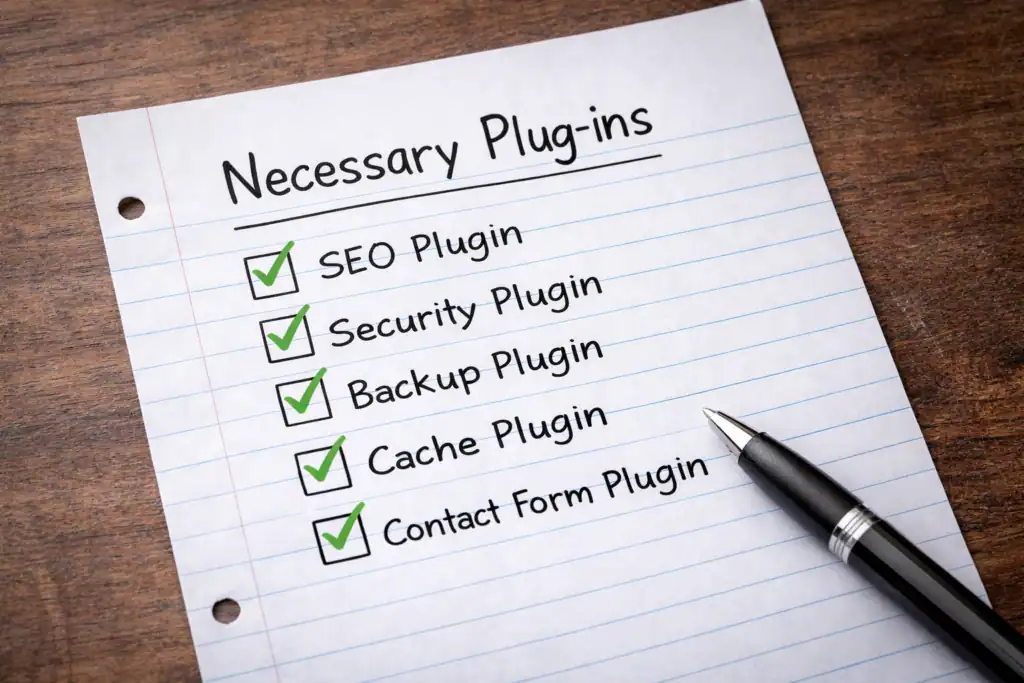
Plugins are add-ons that extend WordPress’s functionality.
You don’t need dozens of them — too many plugins slow your site down. But a small core set of essential plugins makes a significant difference.
RankMath SEO is the SEO plugin that guides you through optimising each post for search engines.
It handles your meta titles, meta descriptions, sitemaps, and gives you an on-page checklist for every post.
It’s free and one of the most capable SEO plugins available. Install this before you publish a single post.
Smush or ShortPixel compresses your images automatically to reduce file size without visible quality loss.
Image file size is one of the most common causes of slow page load speeds, which directly affects both user experience and search rankings.
UpdraftPlus handles automatic backups of your site.
This is non-negotiable — losing months of work to a technical issue because you had no backup is a painful and entirely avoidable experience.
Akismet Anti-Spam protects your comments section from spam submissions. It comes pre-installed with WordPress and simply needs to be activated with a free API key.
WP Rocket or LiteSpeed Cache improves your site’s loading speed through caching — a technical process that essentially saves ready-to-serve versions of your pages so they load faster for visitors.
Page speed is a confirmed Google ranking factor and worth taking seriously from the start.
Step 6: Create Your Core Pages
Before you start publishing blog posts, your site needs a few essential pages that every professional blog should have.
About Page — This is often the second most visited page on any blog after the homepage.
It’s where new visitors go to understand who you are, what your blog is about, and why they should trust you.
Write it in first person, be genuine about your background and your reasons for starting the blog, and make it clear who your content is intended to help.
Contact Page — Brands, advertisers, and readers need a way to reach you. A simple contact form is sufficient.
There are several free WordPress plugins that handle this including WPForms Lite and Contact Form 7.
Privacy Policy — This is a legal requirement if you collect any data from visitors, which you will be doing through analytics, comment forms, and email sign-ups.
Most hosting providers offer privacy policy generators, and there are free templates available specifically for bloggers.
Disclaimer Page — Essential if you’re monetising through affiliate marketing. This page discloses your affiliate relationships to readers and is required for compliance with FTC guidelines.
Keep it simple and straightforward.
Step 7: Plan Your First Ten Posts
You don’t need to have your full content strategy mapped out before you launch, but having your first ten post ideas ready means you can publish consistently from day one — which is important for both audience building and signalling to Google that your site is actively maintained.
When planning these initial posts, think about the questions your ideal reader is most commonly asking.
What problems are they trying to solve? What confusions do they have that you can clear up? What is the first thing someone new to your niche needs to understand before anything else makes sense?
Each post should target a specific long-tail keyword — a more detailed, specific phrase that your ideal reader might actually type into Google.
Long-tail keywords have lower competition than broad terms, which means a new blog has a realistic chance of ranking for them without years of established authority.
A post targeting “how to start affiliate marketing with no money” will rank far sooner than a post targeting “affiliate marketing” alone.
Plan a mix of post types — how-to guides that walk readers through a process step by step, myth-busting posts that challenge common misconceptions, comparison posts that help readers choose between options, and listicles that provide practical value quickly.
Variety keeps your content library interesting and attracts different types of searches.
Step 8: Write and Publish Your First Post
With your platform set up, your essential plugins installed, your core pages live, and your first ten ideas planned, you’re ready to write.
Open a new post in WordPress by going to Posts then Add New. Give your post a working title, then write naturally and thoroughly.
Cover the topic in genuine depth — aim for a minimum of 1,000 words and ideally 1,500 to 2,000 for most beginner-level topics.
Longer, comprehensive posts consistently outperform thin content in search rankings.
Use your focus keyword in your title, your opening paragraph, at least one subheading, and your meta description in RankMath.
From that point, write naturally — don’t force the keyword in repeatedly. Use related phrases and synonyms throughout.
Google understands context and rewards natural, readable writing far more than robotic keyword repetition.
Break your content into short paragraphs of three to four lines maximum. Use subheadings to guide readers through the post.
Add at least one image with descriptive alt text. Include links to two or three other posts on your site once you have them, and at least one link to a credible external source.
Before publishing, fill in your meta description in RankMath — write it as a compelling one or two sentence summary of what the post delivers, including your focus keyword naturally.
Check that your URL slug is clean and keyword-relevant. Set a featured image. Then hit publish.
Step 9: Set Up Google Search Console and Google Analytics
These two free Google tools are essential for understanding how your blog is performing and they should be set up as early as possible — ideally before or immediately after your first post goes live.
Google Search Console shows you which keywords your site is appearing for in search results, how many people are clicking through to your posts, which pages are indexed, and any technical issues Google has identified with your site.
It’s your direct window into how Google sees your blog.
To set it up, go to search.google.com/search-console, add your website as a property, verify ownership using the method your host supports (typically a DNS record or HTML tag), and submit your sitemap.
Your sitemap URL is typically yourdomain.com/sitemap.xml if you have RankMath installed.
Google Analytics tracks your visitor behaviour — how many people visit your site, which posts they read, how long they stay, where they came from, and what device they’re using.
This data becomes invaluable as your blog grows and you start making decisions about what content to create more of.
Both tools are free and the combination of data they provide is more useful than any paid analytics tool for a blog at the early stage.
Step 10: Commit to a Publishing Schedule and Stick to It
The single biggest factor separating blogs that grow from blogs that stagnate is consistency. Google rewards regularly updated sites.
Audiences return to blogs that publish reliably.
And the compounding effect of a growing content library — where each new post links to existing posts and builds your site’s overall authority — only works if you keep adding to it.
For most bloggers one to two posts per week is a sustainable pace that builds momentum without leading to burnout.
Two high-quality posts per week is significantly better than five rushed, thin posts. Quality always outperforms quantity in the current search environment.
Create a simple content calendar — even a basic spreadsheet with your planned post titles, target keywords, and intended publish dates — and treat those dates as commitments rather than suggestions.
The blogs that succeed over time are not necessarily the ones with the most talent or the biggest starting audience.
They’re the ones that showed up consistently when results were slow, kept publishing when it felt like nobody was watching, and trusted the process long enough for the compounding effects to kick in.
Frequently Asked Questions
How much does it cost to start a blog?
The minimum realistic budget for a self-hosted WordPress blog is approximately $50–$100 for the first year, covering domain registration and basic hosting.
Many of the best tools — WordPress itself, RankMath, Google Analytics, Google Search Console, and Canva for graphics — are free.
You can start lean and invest in premium tools as your blog generates income.
Do I need technical skills to start a blog?
No. Modern hosting platforms like Hostinger make WordPress installation a one-click process.
WordPress itself is designed for non-technical users and the learning curve for basic blogging is genuinely manageable within a few days of use.
For anything more complex, free tutorials on YouTube cover virtually every WordPress question imaginable.
How long before my blog starts getting traffic?
Most new blogs begin seeing meaningful organic search traffic between six and twelve months after launch with consistent publishing and basic SEO practices.
This timeline can be shortened by sharing content on social media, Pinterest, and relevant online communities from day one.
The quiet early months are normal — keep publishing.
How many posts should I publish before launching?
You can launch with as few as three to five posts, provided they are well-written and properly optimised.
Having some content live from day one gives visitors something to read and gives Google something to evaluate.
Don’t wait until you have twenty posts to go live — start building your domain’s age and authority as early as possible.
Can I start a blog while working full time?
Absolutely.
Many successful bloggers built their platforms entirely in evenings and weekends before transitioning to it full time. One well-crafted post per week is enough to build meaningful momentum over time.
Consistency matters far more than volume.
What is the best niche for a beginner blogger?
The best niche is one that sits at the intersection of your genuine knowledge or passion, demonstrable search demand, and commercial potential.
There is no universally best niche — the right one for you depends on what you can write about authentically and consistently over a long period.
How do beginner bloggers make money?
The most accessible monetisation methods for new bloggers are affiliate marketing — recommending products and earning commissions on sales — and display advertising once traffic reaches sufficient volume.
As a blog grows, digital products, online courses, sponsored posts, and consulting services all become viable additional income streams.
Do I need to be on social media to grow my blog?
Social media helps accelerate growth but is not strictly required. Google search, Pinterest, and email marketing can drive substantial traffic independently.
That said, sharing your posts in relevant online communities and on social platforms speeds up the early stages considerably and is worth building into your routine from the start.
Final Thoughts
Starting a blog in 2026 is not complicated — but it does require commitment to doing the foundational steps properly and patience with the timeline that organic growth naturally follows.
The bloggers who succeed are not always the most talented writers or the most technically skilled.
They are the ones who chose a clear niche, set up their platform correctly, published consistently, and kept going through the quiet early months when results felt invisible.
Everything you need to get started is either free or very low cost. The tools exist. The knowledge is available.
The only variable is whether you’re willing to show up consistently long enough for the effort to compound into something real.
Start today. Your future readers are already out there searching for exactly what you have to say.
This post contains affiliate links. If you make a purchase through these links I may earn a small commission at no extra cost to you. I only recommend products and services I genuinely believe in.