Introduction: The Email List That Runs Itself
It’s 3 AM. You’re sleeping.
But your email list is working. Email automation is quietly working behind the scenes.
Someone downloads your lead magnet. Welcome sequence starts automatically. They receive value email #1, then #2, then #3. By day 7, they’re reading your product pitch. By day 10, they buy. $297 hits your account.
You didn’t write a single email that night. You wrote those emails once, 6 months ago.
This is email automation done right.
Not:
- Impersonal robot messages that feel cold
- Set-it-and-forget-it systems that deteriorate
- Generic broadcasts to everyone
But:
- Personalized sequences triggered by behavior
- Smart workflows that respond to actions
- Targeted messages to specific segments
- Systems that generate revenue while you focus on growth
The difference between 6-figure and 7-figure email marketers?
It’s not list size. It’s automation sophistication.
This post will show you how to build an email automation system that:
- On-boards new subscribers automatically
- Nurtures them toward purchases
- Delivers products without your involvement
- Segments based on behavior
- Monetizes continuously
- Scales infinitely
By the end, you’ll have a complete blueprint for automating 90% of your email marketing while improving results.
Let’s build your automated email business.
The Automation Misconception
What Automation Is NOT
Misconception #1: “Set it and forget it”
Reality: Automation requires regular maintenance, testing, and optimization.
Think of it like a garden:
- You plant seeds (build sequences)
- They grow automatically (sequences run)
- But you still need to water, weed, prune (maintain and optimize)
Neglected automation degrades over time:
- Links break
- Offers expire
- Messaging becomes stale
- Metrics decline
Good automation = built once, maintained regularly
Misconception #2: “Automation means impersonal”
Reality: Good automation feels MORE personal than manual emails.
Why?
- Triggered by specific actions (shows you’re paying attention)
- Relevant to their interests (segmentation)
- Timely (right message, right time)
- Consistent (they get what they need when they need it)
Example:
Bad automation: “Dear [First Name], check out our products!”
Good automation: “Hey Sarah, I noticed you downloaded the Email Copy-writing Guide last week. How’s it going? Most people get stuck on subject lines—if that’s you, I recorded a bonus training just for people who got this guide: [LINK]”
Good automation uses behavior to create relevance.
Misconception #3: “I need expensive software”
Reality: Most email platforms include automation features.
Platforms with robust automation:
- ConvertKit (Free up to 1,000 subscribers)
- ActiveCampaign (Starts at $29/month)
- Drip (Starts at $39/month)
- Klaviyo (Free up to 250 subscribers)
- MailerLite (Free up to 1,000 subscribers)
You don’t need $500/month enterprise software to start.
Misconception #4: “Automation is too complex for me”
Reality: Start simple, add complexity over time.
Phase 1: Basic Automation (Month 1)
- Welcome sequence
- Lead magnet delivery
- One nurture sequence
Phase 2: Intermediate Automation (Month 2-3)
- Multiple sequences for different lead magnets
- Basic segmentation (buyers vs. non-buyers)
- Re-engagement sequence
Phase 3: Advanced Automation (Month 4-6)
- Behavioral triggers
- Complex workflows
- Dynamic segmentation
- A/B testing automation
You don’t need Phase 3 on day 1. Start with Phase 1.
Why Manual Email Marketing Doesn’t Scale

The Time Trap
Manual email marketing requires:
- Writing each email individually
- Manually sending to segments
- Remembering who got what
- Following up with each person
- Tracking everything manually
Your time capacity:
- 10 subscribers = manageable
- 100 subscribers = challenging
- 1,000 subscribers = impossible
- 10,000 subscribers = you need automation
The math:
Manual approach:
- 5 minutes per personalized email
- 100 subscribers = 500 minutes (8+ hours)
- Every. Single. Week.
Automated approach:
- Set up sequences once (10-15 hours upfront)
- Then: 0 minutes per subscriber
- Scales to 10,000 subscribers with same effort
The Consistency Problem
Manual email challenges:
- Forget to send
- Send at inconsistent times
- Skip weeks when busy
- Vary quality based on mood/energy
Automation solves:
- Never misses a send
- Consistent timing
- Every subscriber gets full sequence
- Quality remains constant
Consistency = trust = conversions
The Opportunity Cost
Time spent on manual emails = time NOT spent on:
- Creating new products
- Growing your audience
- Improving your offers
- Building partnerships
- Strategic thinking
Automation frees you to focus on high-leverage activities.
The Revenue Ceiling
Without automation, you hit a revenue ceiling:
Manual approach:
- Can only send to entire list at once
- No personalization at scale
- Miss optimal timing for each person
- Limited follow-up capacity
Result: Lower conversion rates, capped revenue
Automated approach:
- Triggered sequences for each segment
- Personalized timing (when THEY’RE ready)
- Unlimited follow-up capacity
- No ceiling
Same list size, 3-5x revenue with automation.
The 5 Pillars of Email Automation
Pillar #1: Trigger-Based Sequences
What it is: Emails automatically sent based on specific actions or events.
Common triggers:
- Subscribes to list → Welcome sequence
- Downloads lead magnet → Nurture sequence
- Clicks link → Interest-based sequence
- Purchases product → Customer on-boarding
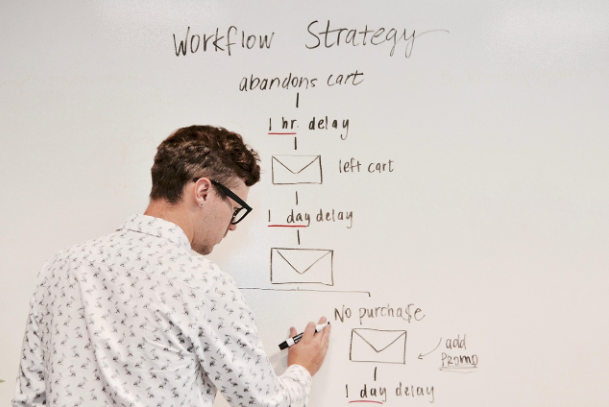
- Abandons cart → Recovery sequence
- No engagement for 30 days → Re-engagement
- Completes course → Up-sell sequence
Why it matters: Right message at right time = higher conversions.
Pillar #2: Behavioral Segmentation
What it is: Automatically grouping subscribers based on actions.
Segments created automatically:
- Opened email about topic X → Interested in X
- Clicked link to product → High purchase intent
- Purchased product A → Customer, candidate for product B
- Didn’t open last 5 emails → Low engagement
- Opened every email → Super engaged
Why it matters: Relevant messaging to each segment = better results.
Pillar #3: Conditional Logic
What it is: IF/THEN rules that customize the subscriber journey.
Examples:
IF subscriber clicks on freelancing content
THEN send freelancing-specific sequence
ELSE send general content
IF subscriber purchases course
THEN send customer on-boarding
AND remove from prospect sequences
ELSE continue nurture sequence
IF subscriber opens email about webinar
THEN send webinar invitation
IF subscriber registers for webinar
THEN send webinar reminder sequence
IF subscriber attends webinar
THEN send post-webinar offer
Why it matters: Personalized journeys without manual intervention.
Pillar #4: Time-Based Automation
What it is: Emails sent based on time delays or specific dates.
Time delay examples:
- Immediately after action
- 2 days after subscription
- 1 week after purchase
- 30 days after last engagement
Date-based examples:
- Birthday emails
- Anniversary of subscription
- Seasonal promotions
- Product launch dates
Why it matters: Optimal timing maximizes engagement and sales.
Pillar #5: Cross-Platform Integration
What it is: Email automation connected to other tools.
Integrations:
- E-commerce (Shopify, WooCommerce): Purchase → customer sequence
- Course platforms (Teachable, Kajabi): Course completion → up-sell
- CRM (Salesforce, HubSpot): Lead scoring → email priority
- Landing pages (Leadpages, Unbounce): Signup → specific sequence
- Webinar platforms (Zoom, WebinarJam): Registration → reminder sequence
Why it matters: Seamless automation across entire customer journey.
Building Your Automation Foundation
Step 1: Map Your Customer Journey
Before building automation, visualize the path:
Awareness → Interest → Decision → Purchase → Loyalty
Map it out:
Awareness:
↓
Finds content → Visits website → Downloads lead magnet
↓
Interest:
Welcome sequence → Value emails → Social proof
↓
Decision:
Product education → Benefits → Objection handling
↓
Purchase:
Sales sequence → Purchase decision
↓
Loyalty:
On-boarding → Support → Up-sell → Advocacy
Each stage needs automated sequences.
Step 2: Identify Key Actions & Triggers
List every important action a subscriber can take:
Awareness stage:
- Subscribes to list (trigger: welcome sequence)
- Downloads specific lead magnet (trigger: topic-specific nurture)
Interest stage:
- Opens emails consistently (trigger: tag as “engaged”)
- Clicks product-related links (trigger: sales sequence)
- Joins webinar (trigger: webinar follow-up)
Decision stage:
- Visits sales page (trigger: cart abandonment sequence)
- Adds to cart but doesn’t buy (trigger: recovery emails)
Purchase stage:
- Completes purchase (trigger: on-boarding + remove from sales sequences)
Loyalty stage:
- Completes on-boarding (trigger: up-sell sequence)
- Uses product for 30 days (trigger: review request)
- Achieves result (trigger: case study invitation + testimonial request)
Document all triggers—these become your automation rules.
Step 3: Choose Your Automation Platform
Key features you need:
Must-have: ✅ Trigger-based sequences
✅ Tag/segment management
✅ Conditional logic (if/then)
✅ Time delays
✅ Analytics per sequence
Nice-to-have: ✅ Visual automation builder
✅ A/B testing
✅ Lead scoring
✅ Advanced reporting
Recommended platforms by list size:
0-1,000 subscribers:
- ConvertKit (free, great for beginners)
- MailerLite (free, simple automation)
1,000-5,000 subscribers:
- ConvertKit ($29/month)
- ActiveCampaign ($29/month, more powerful)
5,000+ subscribers:
- ActiveCampaign ($49+/month)
- Drip ($39+/month, e-commerce focus)
- Klaviyo (advanced, e-commerce)
Step 4: Set Up Your Tagging System
Tags = labels that trigger automation
Essential tags:
Engagement level:
- Highly engaged
- Moderately engaged
- Low engagement
- Non-engaged
Interest areas:
- Interested in [Topic A]
- Interested in [Topic B]
- Interested in [Topic C]
Purchase behavior:
- Lead magnet downloaded
- Wait-list joined
- Cart abandoned
- Purchased [Product A]
- Purchased [Product B]
Customer stage:
- Subscriber
- Lead
- Customer
- VIP customer
Use tags to trigger sequences and segment sends.
Step 5: Create Your Sequence Library
Build these core sequences first:
Essential sequences:
- Welcome sequence (5-7 emails)
- Nurture sequence (ongoing, weekly)
- Product launch sequence (10-12 emails)
- Cart abandonment (3 emails)
- Customer on-boarding (5 emails)
- Re-engagement (3 emails)
Advanced sequences: 7. Webinar funnel (8-10 emails) 8. Tripwire to core offer (5 emails) 9. Product education sequence (varies) 10. Up-sell sequence (5 emails) 11. Referral request sequence (3 emails)
Start with the essential sequences. Add advanced as you grow.
The Core Automation Sequences
Sequence #1: The Welcome Sequence
Trigger: New subscriber joins list
Purpose: Build trust, establish authority, deliver quick win
Length: 5-7 emails over 10-14 days
Structure:
Email 1: Immediate – Welcome + Delivery
- Deliver lead magnet
- Set expectations
- Introduce yourself briefly
- No selling
Email 2: Day 2 – Your Story
- Share your journey
- Build relatability
- Show you understand their struggle
- Soft positioning
Email 3: Day 4 – Quick Win
- Actionable tip they can implement today
- Build credibility
- Demonstrate expertise
- Still no hard selling
Email 4: Day 6 – Social Proof
- Case study or testimonials
- Show what’s possible
- Build desire
- Mention products exist
Email 5: Day 8 – Framework Introduction
- Teach your methodology
- Position your approach
- Soft pitch for product
- CTA: Learn more
Email 6: Day 10 – The Invitation (Optional)
- Present your core offer
- Clear benefits
- Risk reversal
- CTA: Enroll or learn more
Email 7: Day 14 – Continue Journey
- Transition to nurture sequence
- Reiterate value you provide
- Invite engagement
Expected conversion: 3-8% convert to first purchase within welcome sequence
Sequence #2: The Evergreen Nurture Sequence
Trigger: Completes welcome sequence OR ongoing subscriber
Purpose: Continuous value delivery, ongoing relationship building
Length: Indefinite (weekly emails)
Structure:
Week 1: Value Email
- Teach something useful
- No pitch
- Build trust
Week 2: Story + Lesson
- Personal story
- Extract lesson
- Relate to their journey
- Soft product mention
Week 3: Case Study
- Share someone’s transformation
- Could be customer or your own
- Inspire action
Week 4: Value + Product Mention
- Deliver value
- Natural product reference
- Low-pressure CTA
Week 5-8: Repeat cycle
This runs indefinitely. They stay in this until they take an action that triggers a different sequence.
Sequence #3: The Product Launch Sequence
Trigger: Launch begins (manual or scheduled)
Purpose: Generate concentrated sales during launch period
Length: 10-12 emails over 10-14 days
We covered this in detail in Post #9, but here’s the automation setup:
Automation rules:
IF subscriber is on “Launched to” list
AND has NOT purchased
THEN receive launch sequence
IF subscriber purchases during launch
THEN remove from launch sequence
AND add to customer on-boarding sequence
IF launch closes and subscriber didn’t buy
THEN remove from launch sequence
AND return to nurture sequence
AND tag “Didn’t buy [Product] – [Date]”
Sequence #4: Cart Abandonment Sequence
Trigger: Visits sales page but doesn’t purchase (use pixel tracking or custom link)
Purpose: Recover lost sales
Length: 3 emails over 5 days
Email 1: 2 hours after abandonment – Did something go wrong?
Subject: Did something go wrong?

Hey [Name],

I noticed you were checking out [Product] but didn't complete
your enrollment.

No judgment—it happens. But I wanted to check in.

Were you:
- Unsure if this is the right fit?
- Waiting for a payment plan?
- Comparing options?
- Just browsing?

Whatever it is, I'm here to help. Just reply with your question.

If price is the concern, I do have a 3-payment option available:
[LINK]

Thanks,
[Your Name]
Email 2: Day 2 – Overcome objections
Subject: Common questions about [Product]

Hey [Name],

Still thinking about [Product]?

Here are the questions I get most often:

Q: "Will this work for someone starting from scratch?"
A: Yes. [Specific answer with example]

Q: "How much time does this require?"
A: [Realistic time commitment]

Q: "What if it doesn't work for me?"
A: [Money-back guarantee details]

Any other questions? Just reply to this email.

Ready to start? [ENROLL NOW]

[Your Name]
Email 3: Day 5 – Final invitation
Subject: Last chance for [Product]

Hey [Name],

I'm closing enrollment for [Product] this week.

After that, you'll have to wait until the next cohort (not sure
when that will be yet).

If you've been on the fence, now's the time to decide.

Here's what you get: [Brief recap]

Still interested? [ENROLL NOW]

If not, no worries—I'll continue sending valuable content every
week.

Talk soon,
[Your Name]
Recovery rate: 10-30% of those who abandon complete purchase with this sequence
Sequence #5: Customer On-boarding Sequence
Trigger: Purchase completed
Purpose: Ensure customer success, reduce refunds, set up for up–sell
Length: 5 emails over 14 days
Email 1: Immediate – Welcome to the program
Subject: Welcome to [Product]! Here's what happens next

Hey [Name],

Welcome! You're officially enrolled in [Product].

Here's what happens next:

→ Access your account: [LINK]
→ Start with Module 1: [LINK]
→ Join the community: [LINK]

Your Quick-Start Action Plan:
1. Watch the welcome video (5 minutes)
2. Download the workbook
3. Complete the first lesson
4. Introduce yourself in the community

Questions? Our support team is here: [EMAIL]

Excited to see your results!

[Your Name]
Email 2: Day 3 – Check-in
Subject: How's [Product] going so far?

Hey [Name],

You've had [Product] for a few days now.

How's it going?

Most people get stuck on [common sticking point]. If that's you,
check out this bonus training: [LINK]

And if you have any questions, just reply to this email.

Keep going!
[Your Name]
Email 3: Day 7 – First win celebration
Subject: Have you had your first win yet?

Hey [Name],

Week one complete!

By now, you should have [expected progress].

If you've had a win (big or small), I'd love to hear about it!
Reply and tell me what you accomplished.

If you're stuck, let me know—I'm here to help.

Next up: Module 2 is where things get really interesting.

Keep going!
[Your Name]
Email 4: Day 10 – Resource reminder
Subject: Don't forget about these bonuses

Hey [Name],

Quick reminder: You have access to these bonus resources inside
[Product]:

→ [Bonus 1] - [LINK]
→ [Bonus 2] - [LINK]
→ [Bonus 3] - [LINK]

Most people forget these exist—don't miss them!

How's your progress? Reply and let me know.

[Your Name]
Email 5: Day 14 – Check-in + Soft up-sell
Subject: Two weeks in—how are you doing?

Hey [Name],

You're two weeks into [Product] now.

How's it going?

If you're loving the results so far, I want to make you aware of
[Premium Product].

It takes what you're learning in [Current Product] and adds:
- [Advanced feature]
- [Personal support]
- [Exclusive access]

About 30% of [Product] customers upgrade to [Premium] within the
first month—if you're interested, here's the link: [LINK]

If not, no worries—keep crushing it with [Product]!

[Your Name]
Expected outcome: Lower refund rate, higher satisfaction, 20-30% upgrade rate
Sequence #6: Re-Engagement Sequence
Trigger: No email opens in 30+ days
Purpose: Win back inactive subscribers or clean list
Length: 3 emails over 10 days
Email 1: Day 0 – Miss me?
Subject: Are we still friends?

Hey [Name],

I noticed you haven't opened my emails in a while (no judgment—
inboxes are overwhelming).

But before you completely tune out, I have a quick question:

Would you rather...

A) Keep getting weekly emails (I promise to make them worth it)
B) Switch to monthly digest only (less frequent, still valuable)
C) Unsubscribe completely (no hard feelings)

Just reply with A, B, or C.

Thanks,
[Your Name]
Email 2: Day 5 – Value bomb
Subject: My best content from the last 30 days

Hey [Name],

You might have missed these emails—here's what you missed this month:

1. [Best post #1 with link]
2. [Best post #2 with link]
3. [Best resource with link]

Still interested in [your niche topic]?

If yes, I'd love to keep you on the list.
If not, that's okay too—just click here to unsubscribe: [LINK]

Thanks,
[Your Name]
Email 3: Day 10 – Final chance
Subject: Should I keep sending these?

Hey [Name],

This is my last email unless I hear from you.

I only want to email people who actually want to hear from me.

If you want to stay on the list, just click here: [LINK]

If not, no worries—I'll remove you after this email.

Thanks for being here,
[Your Name]
Then: If no engagement, automatically unsubscribe or tag “Non-engaged – archive”
Re-engagement rate: 5-15% become active again
Advanced Automation Workflows
Workflow #1: Interest-Based Routing
Purpose: Send different content based on interests
Setup:
Subscriber joins list
↓
Welcome sequence
↓
Email 5: "What's your biggest challenge?"
- A) List building
- B) Email copy-writing
- C) Monetization
↓
Click A → Tag "Interested in list building" → List building sequence
Click B → Tag "Interested in copy-writing" → Copy-writing sequence
Click C → Tag "Interested in monetization" → Monetization sequence
Result: Highly relevant content = higher engagement and conversions
Workflow #2: The Tripwire Ascension
Purpose: Move customers up value ladder automatically
Setup:
Subscriber downloads lead magnet
↓
Welcome sequence
↓
Email 6: Tripwire offer ($27)
↓
IF purchases → Tag "Tripwire customer" → Tripwire on-boarding (3 emails)
                ↓
                Email 3: Core offer ($297)
                ↓
                IF purchases → Tag "Core customer" → Core on-boarding (5 emails)
                                ↓
                                Email 5: Premium offer ($997)
                                ↓
                                IF purchases → Tag "Premium customer"
                ↓
IF doesn't purchase → Continue nurture sequence
Result: Automatic ascension up value ladder
Workflow #3: Webinar Funnel Automation
Purpose: Automate entire webinar process
Setup:
Subscriber clicks webinar invitation
↓
IF registers → Tag "Webinar registrant"
              ↓
              Reminder sequence:
              - 7 days before: Confirmation email
              - 3 days before: Reminder #1
              - 1 day before: Reminder #2
              - 1 hour before: Final reminder
              ↓
              IF attends → Tag "Webinar attendee"
                          ↓
                          Post-webinar sequence (5 emails)
                          - Email 1: Replay + offer
                          - Email 2: FAQ
                          - Email 3: Case study
                          - Email 4: Bonuses expiring
                          - Email 5: Cart closing
                          ↓
                          IF purchases → Customer on-boarding
                          IF doesn't purchase → Return to nurture
              ↓
              IF doesn't attend → Tag "No-show"
                                 ↓
                                 - Email: Replay available
                                 - Shortened post-webinar sequence (3 emails)
Result: Fully automated webinar funnel, 2-5% conversion rate
Workflow #4: Behavior-Based Product Recommendations
Purpose: Recommend products based on content engagement
Setup:
Track email clicks:

IF clicks 3+ emails about topic A
→ Tag "Interested in A"
→ Send product recommendation for Product A
   ↓
   IF purchases → Customer sequence
   IF doesn't purchase → Continue tracking

IF clicks 3+ emails about topic B
→ Tag "Interested in B"
→ Send product recommendation for Product B
   ↓
   Same logic
Result: Relevant product recommendations = higher conversion
Workflow #5: Anniversary & Milestone Automation
Purpose: Celebrate milestones, request reviews, encourage renewals
Setup:
New customer purchases
↓
Tag with purchase date
↓
30 days after purchase:
- Email: "How's it going?" + request feedback
- IF positive response → Request testimonial

60 days after purchase:
- Email: "2 months in—what results have you seen?"
- IF great results → Invite to case study

90 days after purchase:
- Email: "Ready for the next level?" + up-sell offer

365 days after purchase:
- Email: "Happy one-year anniversary!" + loyalty reward/renewal
Result: Higher engagement, more testimonials, better retention
Segmentation on Autopilot
Dynamic Segmentation Rules
Set up rules that automatically move subscribers between segments:
Engagement-based:
IF opens 75%+ of emails in 30 days
→ Add to "Highly engaged" segment
→ Send to them first on launches

IF opens <25% of emails in 30 days
→ Add to "Low engagement" segment
→ Enter re-engagement sequence
Interest-based:
IF clicks 3+ emails about "list building"
→ Add to "List building interest" segment
→ Send list-building content + offers

IF clicks 3+ emails about "monetization"
→ Add to "Monetization interest" segment
→ Send monetization content + offers
Purchase-based:
IF purchases any product
→ Remove from prospect sequences
→ Add to customer sequences
→ Tag with product purchased

IF customer purchase was 6+ months ago
→ Tag "Past customer - win back"
→ Send re-engagement offer
Lead score-based:
Assign points for behaviors:
- Opens email: +1 point
- Clicks link: +3 points
- Visits sales page: +5 points
- Adds to cart: +10 points

IF lead score > 50
→ Add to "Hot leads" segment
→ Send to sales team (if applicable)
→ Or send direct sales sequence
The Segmentation Matrix
Combine multiple criteria for ultra-targeted segments:
| Segment Name | Criteria | Send What |
|---|---|---|
| Hot Leads | High engagement + visited sales page + not purchased | Direct sales emails |
| Warm Prospects | Moderate engagement + interested in topic | Nurture + soft pitches |
| Cold Subscribers | Low engagement + no clicks | Re-engagement sequence |
| Tripwire Customers | Bought $27 product + high engagement | Core product offer |
| Core Customers | Bought $297 product + using for 30+ days | Premium up-sell |
| VIP Customers | Bought premium + high satisfaction | Early access, exclusives |
Each segment gets different messaging, offers, and frequency.
The Revenue-Generating Automation Stack
Stack Component #1: Lead Magnet Funnel
Automation flow:
Visitor → Landing page → Opt-in
↓
Immediate: Deliver lead magnet
↓
Email 1 (1 hour later): Check your inbox (in case they missed it)
↓
Email 2 (Day 1): Welcome + set expectations
↓
Email 3 (Day 2): Quick win related to lead magnet
↓
Email 4 (Day 3): Your story
↓
Email 5 (Day 5): Soft pitch for paid product
↓-
Email 6 (Day 7): Case study
↓
Email 7 (Day 10): Direct offer
↓
IF purchases → Customer on-boarding
IF doesn't purchase → Continue to nurture
Conversion: 3-5% of opt-ins become customers within 10 days
Stack Component #2: Content Engagement Funnel
Automation flow:
Blog visitor → Reads post
↓
Exit-intent popup: Content upgrade
↓
Opt-in → Receive content upgrade
↓
IF clicks related content in email
→ Tag interest + send more related content
   ↓
   IF clicks 3+ times on topic
   → Send related product offer
      ↓
      IF purchases → Customer sequence
Conversion: Higher than standard funnel (5-8%) because already engaged with content
Stack Component #3: Webinar Funnel
Automation flow:
Ad/Email promotion → Webinar registration page
↓
Register → Tag "Webinar registrant" + reminder sequence
↓
Webinar happens
↓
IF attends → Tag "Attendee" + post-webinar sequence (5 emails over 7 days)
             ↓
             Email 1: Replay + offer
             Email 2: FAQ
             Email 3: Case study
             Email 4: Urgency (bonuses expire)
             Email 5: Final call (cart closes)
             ↓
             IF purchases → Customer on-boarding
             IF doesn't purchase → Tag "Attended but didn't buy" + nurture

IF doesn't attend → Tag "No-show" + replay email + shortened sequence (3 emails)
Conversion: 2-5% of attendees, 0.5-2% of no-shows
Stack Component #4: Abandoned Cart Recovery
Automation flow:
Visitor → Sales page → Adds to cart → Leaves without buying
↓
Trigger: Cart abandoned
↓
Email 1 (2 hours later): "Did something go wrong?"
Email 2 (1 day later): Overcome objections
Email 3 (3 days later): "Last chance" + special offer
↓
IF purchases → Customer on-boarding
IF doesn't purchase → Tag "Cart abandoned [date]" + nurture
Recovery rate: 15-30% complete purchase
Stack Component #5: Customer Ascension Ladder
Automation flow:
New customer purchases Product A ($27)
↓
On-boarding sequence (5 emails over 14 days)
↓
Day 14: Offer Product B ($297) as natural next step
↓
IF purchases → On-boarding for Product B
               ↓
               Day 14: Offer Product C ($997)
               ↓
               IF purchases → VIP customer treatment
IF doesn't purchase → Continue nurture with occasional mentions
Ascension rate: 20-40% of customers ascend at least one level
The Complete Revenue Stack (All Combined)
Traffic Sources
    ↓
Lead Magnets → Welcome sequences → Nurture sequence
    ↓              ↓                      ↓
    └──────────────┴──────────────────────┘
                    ↓
        Behavioral segmentation
        (engagement, interest, behavior)
                    ↓
            Multiple pathways:
    ↓               ↓               ↓
Webinar funnel  Content funnel  Direct offer
    ↓               ↓               ↓
    └───────────────┴───────────────┘
                    ↓
            Product purchase
                    ↓
        Customer on-boarding
                    ↓
            Ascension ladder
    ↓               ↓               ↓
Product 2      Product 3      Product 4
$297           $997           $2,997
This entire system runs automatically 24/7.
Automation Maintenance & Optimization
The Monthly Automation Audit
Check these monthly:
✅ Email Performance
- Which sequences have best open rates?
- Which emails have lowest engagement?
- Where do people unsubscribe most?
✅ Conversion Rates
- Which sequences convert best?
- Which offers perform poorly?
- Where are drop-offs happening?
✅ Technical Issues
- Any broken links?
- Images loading properly?
- Tracking working correctly?
✅ Content Freshness
- Are testimonials current?
- Do product details need updating?
- Are bonuses still available?
Set a recurring monthly calendar reminder for this audit.
The Quarterly Deep Optimization
Every 90 days, do a deep dive:
1. Sequence Performance Analysis
For each sequence, calculate:
- Open rate trend (improving or declining?)
- Click rate trend
- Conversion rate
- Revenue per subscriber
Then:
- Update poorly performing emails
- A/B test subject lines
- Refresh content
- Update offers if needed
2. Subscriber Journey Mapping
Track actual paths subscribers take:
- Where do they enter?
- Which sequences do they go through?
- Where do they convert?
- Where do they drop off?
Use data to:
- Identify bottlenecks
- Shorten ineffective sequences
- Add missing sequences
- Improve transitions
3. Segmentation Refinement
Review your segments:
- Are they accurate?
- Do they need new criteria?
- Should you add new segments?
- Remove outdated segments
Test:
- Sending to different segments
- Different messaging per segment
- Different offers per segment
4. A/B Testing Schedule
What to test quarterly:
Q.1: Subject lines
- Test curiosity vs. benefit-driven
- Test length (short vs. long)
- Test personalization
Q.2: Email copy
- Test story-based vs. direct
- Test long-form vs. short
- Test different frameworks (PAS, AIDA, etc.)
Q.3: CTAs
- Test button vs. text link
- Test CTA copy
- Test placement (multiple vs. single)
Q.4: Timing
- Test send times
- Test delay between emails
- Test sequence length
Run one test per sequence per quarter.
Automation Metrics Dashboard
Track these KPIs weekly:
| Metric | Current | Last Week | Target |
|---|---|---|---|
| Total subscribers | |||
| New subscribers this week | |||
| Active automation sequences | |||
| Welcome sequence conversion | 5% | ||
| Nurture sequence engagement | 30% | ||
| Sales sequence conversion | 3% | ||
| Re-engagement recovery rate | 10% | ||
| Revenue from automation | |||
| Revenue per subscriber | $2+ |
Green = on target, Yellow = attention needed, Red = urgent fix required
Common Automation Mistakes
Mistake #1: Over-Automating Too Soon
The problem: Building complex workflows before validating demand.
What happens:
- Spend weeks building automation
- Launch to small list
- Doesn’t convert
- Wasted time
The fix:
- Start with manual sends to test messaging
- Once proven, automate
- Build complexity gradually
Rule: Prove it manually first, automate what works.
Mistake #2: Set-It-and-Forget-It Mentality
The problem: Building sequences and never updating them.
What happens:
- Links break
- Offers expire
- Messaging becomes stale
- Performance declines
The fix:
- Monthly audit schedule
- Quarterly deep optimization
- Update as products/offers change
Mistake #3: No Clear Exit Points
The problem: Subscribers stuck in sequences that no longer apply.
What happens:
- Customers still getting sales emails
- Purchased Product A but getting emails for Product A
- Confused subscribers, higher unsubscribe rate
The fix:
- Build exit rules for every sequence
- “IF purchases, THEN remove from this sequence”
- “IF completes action, THEN move to next sequence”
Mistake #4: Ignoring Deliverability
The problem: Automation creates high volume, which can hurt deliverability.
What happens:
- Spam complaints increase
- Inbox placement decreases
- Open rates tank
The fix:
- Regular list cleaning (remove non-engaged)
- Authenticate domain (SPF, DKIM, DMARC)
- Monitor spam complaint rate
- Maintain good engagement metrics
Mistake #5: Generic Automation
The problem: Automation that feels robotic and impersonal.
What happens:
- Low engagement
- High unsubscribe rate
- Poor conversions
The fix:
- Write like you’re emailing one person
- Use behavioral triggers for relevance
- Segment for personalization
- Test and refine copy
Mistake #6: No Manual Touch Points
The problem: 100% automation, zero personal interaction.
What happens:
- Relationship feels transactional
- Miss opportunities for deeper connection
- Limited feedback loop
The fix:
- Occasional broadcast emails from you personally
- Invite replies and respond
- Manual outreach to VIP customers
- Balance automation with authenticity
Rule: 90% automated, 10% manual is the sweet spot.
Your 30-Day Automation Implementation Plan
Week 1: Foundation
Day 1-2: Audit Current State
- What sequences do you have (if any)?
- What’s working, what’s not?
- What’s missing?
- Document subscriber journey
Day 3-4: Platform Setup
- If not already, set up automation-capable platform
- Configure domain authentication
- Set up tracking
- Create tagging structure
Day 5-7: Build Welcome Sequence
- Write 5 emails
- Set up delivery schedule (Day 0, 2, 4, 6, 8)
- Test with your own email
- Go live
Goal by Week 1 end: Welcome sequence live and operational
Week 2: Core Sequences
Day 8-10: Build Nurture Sequence
- Write 4 weeks of content (4 emails)
- Set weekly delivery schedule
- Add to automation (runs after welcome completes)
- Test
Day 11-12: Build Re-Engagement Sequence
- Write 3 emails
- Set trigger: No opens in 30 days
- Set schedule (Day 0, 5, 10)
- Test
Day 13-14: Customer On-boarding (If you have products)
- Write 5 emails
- Set trigger: Purchase completed
- Set schedule (Day 0, 3, 7, 10, 14)
- Test
Goal by Week 2 end: Core sequences operational
Week 3: Monetization Automation
Day 15-17: Build Sales Sequence
- Choose product to promote
- Write 5-email sales sequence
- Set trigger (engagement-based or manual launch)
- Test
Day 18-19: Cart Abandonment Setup
- Set up tracking pixel or tagged link
- Write 3 recovery emails
- Set trigger: Visits sales page, doesn’t buy
- Set schedule (2 hours, 1 day, 3 days)
- Test
Day 20-21: Tripwire Automation (Optional)
- Create low-ticket offer ($27-$47)
- Write 3-email sequence
- Add to end of welcome sequence
- Test
Goal by Week 3 end: Revenue-generating sequences active
Week 4: Optimization & Scaling
Day 22-24: Segmentation Setup
- Define segments (engagement, interest, purchase behavior)
- Set up tagging rules
- Apply tags to existing subscribers
- Create segment-specific messaging
Day 25-26: Integration & Workflows
- Connect email platform to:
- Website forms
- Payment processor
- Course platform (if applicable)
- Test automated triggers
Day 27-28: Analytics Setup
- Create performance dashboard
- Set baseline metrics
- Schedule weekly reviews
Day 29-30: Final Testing & Launch
- Run complete subscriber journey test
- Fix any issues
- Document processes
- Go live with full automation
Goal by Week 4 end: Complete automation system running
Post-Implementation: First 90 Days
Month 2: Monitor & Adjust
- Review metrics weekly
- Make small tweaks
- Gather subscriber feedback
- Adjust based on data
Month 3: Optimize & Scale
- A/B test sequences
- Add advanced workflows
- Build additional sequences
- Scale traffic to automated funnel
Month 4+: Advanced Automation
- Implement behavioral segmentation
- Add predictive automation
- Build product ascension workflows
- Continuous optimization
Conclusion: Your Business on Autopilot
Email automation isn’t about replacing human connection.
It’s about scaling human connection.
Without automation:
- You manually send each email
- You can serve 100, maybe 500 subscribers well
- Your time limits your revenue
- Inconsistency breaks trust
With automation:
- Systems send the right email at the right time
- You can serve 10,000+ subscribers personally
- Your revenue grows while you sleep
- Consistency builds trust
The most profitable email marketers don’t work harder. They automate smarter.
You now have:
✓ Complete understanding of email automation fundamentals
✓ 6 core sequences ready to build
✓ Advanced workflow strategies
✓ Automated segmentation system
✓ Revenue-generating automation stack
✓ Maintenance and optimization framework
✓ 30-day implementation plan
The automation you build this month will generate revenue for years.
Every sequence you create. Every workflow you set up. Every trigger you configure.
They work for you 24/7.
While you’re:
- Sleeping
- Creating new content
- Growing your audience
- Spending time with family
- Building new products
Your email automation is:
- Welcoming new subscribers
- Nurturing relationships
- Generating sales
- On-boarding customers
- Asking for reviews
- Making up-sell offers
This is how 6-figure email businesses become 7-figure email businesses.
Not by working more hours.
By automating intelligently.
Start with your welcome sequence. Build from there.
Your automated email business is 30 days away.
Next in this series: Post #12 – “From Subscribers to Community Leaders: The Duplication Model” – where we’ll show you how to transform your best customers into advocates who build their own audiences using your system.
Your automated email empire starts today.
About This Series: This is Post #11 in the Email Marketing Mastery series, covering everything from foundation to advanced scaling strategies.
Previous Posts:
- Post #1: Why Email Marketing Still Dominates in 2025/26
- Post #2: Starting Your Email List from Zero
- Post #3: Choosing Your Email Platform
- Post #4: Email Copywriting for Beginners
- Post #5: 10 Proven Lead Magnet Ideas
- Post #6: The Welcome Sequence
- Post #7: List Building Strategies for Every Marketing Channel
- Post #8: Email Copywriting That Converts (Without Being Salezy)
- Post #9: Monetization Sequences: From Free Content to Paid Offers
- Post #10: Building Products Your Email List Actually Wants to Buy
Next Post: From Subscribers to Community Leaders: The Duplication Model (coming next week)